Most developer to-do lists are graveyards of half-finished tickets. You start the day with five items, end with twelve, and the core feature you planned to ship never got touched. That's not a speed problem — it's a structure problem.
Time blocking for developers works differently. Instead of listing everything you might do, you commit to one thing at a time inside a scheduled window. This guide covers why to-do lists specifically fail engineering work, how long a block should actually be, and how to build the routine — including where a tool like Daily Focus Planner fits in.
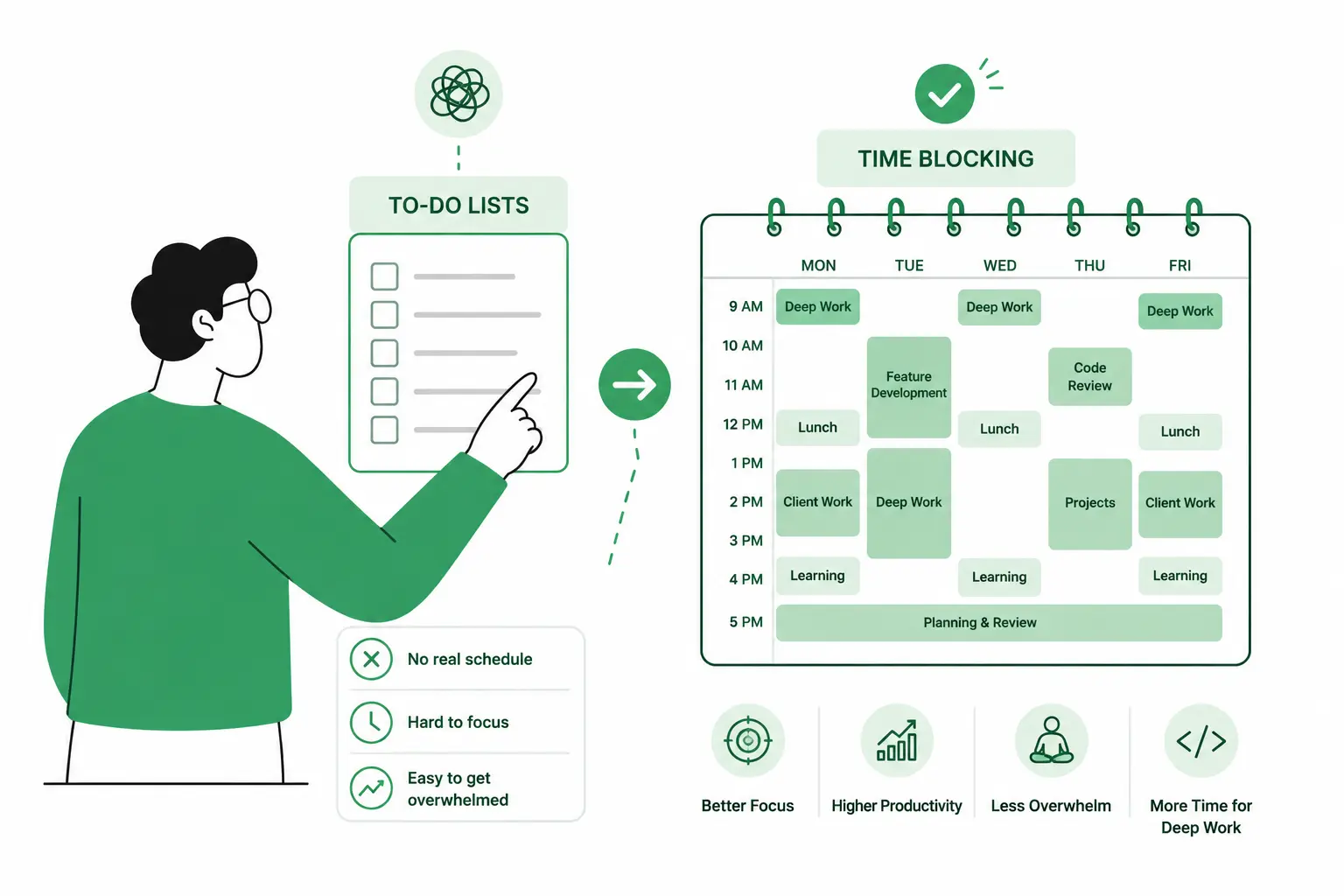
What is time blocking, and how is it different from a to-do list?
Time blocking is the practice of assigning a fixed start and end time to a task on your calendar, instead of just listing it. A to-do list tells you what's on your plate; a time block tells you exactly when you're doing it and for how long.
The difference matters more for developers than for most roles. A ticket sitting on a list can expand to fill an entire day — nothing constrains it. A ticket inside a 90-minute block has a hard edge, which forces you to decide what "done for now" looks like before you even start. For a deeper look at how focus planning tools enforce this constraint, read our guide on choosing a focus planning tool that actually works.
Why do to-do lists fail developers specifically?
To-do lists fail because they put no limit on volume or duration — anything can be added, and nothing has to end. For engineering work, that turns into constant switching between code review, Slack, tickets, and meetings, which is one of the most expensive things you can do to a focused mind.
A few specific ways this shows up:
- No time boundary. Tasks sit on a list with no start or stop point, so anything can expand to fill the whole day — the classic Parkinson's Law problem.
- Too many visible options. When you can see 30 open tickets, your brain treats all 30 as live decisions. That's decision fatigue, and it's draining before you've written a line of code.
- No transition ritual. Jumping between tasks without a deliberate close-out leaves what researchers call "attention residue" — part of your focus stays stuck on the last thing you were doing. Sophie Leroy's research at the University of Washington Bothell found this residue measurably degrades performance on whatever you switch to next.
- Planning and doing live in separate tools. You plan in one app and execute in your head, so the plan never actually shapes the day.
This is the exact gap time blocking is built to close.
How long should a developer's time block be?
Most developers sustain deep, single-threaded work for 30 to 90 minutes before quality starts to slip. Match the block to the work: short, well-defined tickets fit a 30-minute block; design work, debugging, or anything that needs ramp-up time benefits from 60–90 minutes.
Going much longer without a break tends to backfire — fatigue creeps in and the marginal output per minute drops. Gallup's reporting on workplace-interruption research found that even short interruptions can derail a working session for well over 20 minutes, which is part of why protecting the block matters as much as setting its length.
If you'd rather work in shorter, fixed sprints than variable-length blocks, the Pomodoro Technique — 25-minute focus intervals with built-in breaks — is a lighter alternative. Our Pomodoro + Task Log tool runs that exact structure and logs what you actually worked on in each session.
How to build a time-blocking routine
- Pick one priority before opening anything else. Before checking Slack or email, name the single task that would make today a win if nothing else got done.
- Block it on the calendar with a real start and end time. Treat it like a meeting with yourself that can't be moved.
- Cap supporting tasks at two. Anything beyond that goes on a separate "later" list, not today's plan.
- Close other tabs for the duration of the block. The boundary only works if it's actually a boundary.
- Run a two-minute close-out at day's end. Mark what shipped and carry over what didn't. If you want a longer-range view of how your blocks added up over the week, a weekly review of your focus time and completions makes the pattern obvious.
How Daily Focus Planner fits into a time-blocking routine
Daily Focus Planner turns the steps above into one screen: drag a task into a 30-minute slot on a vertical day grid, and that's your plan for the block. There's no board to maintain and no sprint to configure — just the time blocks themselves.
It's built around the same premise as this guide: most days only have room for one real priority, plus a couple of supporting tasks, and everything else is noise until that's done. If the friction points above sound familiar — no time boundary, too many visible tasks, no reset ritual — Daily Focus Planner is built specifically to remove them rather than add another list to maintain.
FAQ
What's the difference between time blocking and a to-do list?
A to-do list organizes everything you need to do, with no limit on how much is visible at once. Time blocking constrains that down to what you're doing right now, inside a scheduled window, which cuts the context-switching that breaks concentration mid-task.
Is time blocking the same as the Pomodoro Technique?
No. Pomodoro is a fixed 25-minute interval with a built-in break, repeated in cycles. Time blocking is more flexible — you choose the block length to match the task. Many developers combine both: Pomodoro intervals inside a longer time-blocked session.
How long should a focus block be for coding work?
Most people sustain deep focus for 30–90 minutes depending on the task. Shorter blocks suit well-scoped tickets; longer blocks suit debugging, design work, or anything with a high ramp-up cost before you're actually productive.
Does time blocking work if my calendar is already full of meetings?
Yes, but it requires defending smaller windows. Even two protected 30-minute blocks around your meetings beat an unstructured list, because each block still has a hard start and stop that meetings can't quietly expand into.
Do I need a digital tool, or does a paper planner work?
Either works if it enforces the same constraints: one visible priority, a real time boundary, and a daily reset. Digital tools like Daily Focus Planner just make the reset and carry-over steps faster than rewriting a list by hand.
How do I stop meetings from blowing up my blocks?
Block your deep-work window first, before meetings get scheduled into your day, and treat it as unavailable by default. Most calendar conflicts happen because the focus block was never actually claimed — protect it the same way you'd protect a client call.
Related reading
- Focus Planning Tool: How to Choose One That Actually Works — what separates real focus tools from glorified to-do lists, plus how to build a routine that sticks
- I replaced Notion with local-first Markdown notes — why one developer moved away from complex productivity setups to simpler, faster tools
In summary
Time blocking isn't another place to track tasks — it's a constraint that forces you to commit to one thing at a time inside a real boundary. If you've outgrown list-based apps, look for a fixed block length, a single-task view, and a daily reset. Daily Focus Planner bundles all three into a routine you can set up in under two minutes.