RAG Pipeline with LangChain and Pinecone for Production
Build a RAG pipeline with LangChain and Pinecone that survives real traffic with reliable retrieval, versioned indexing, and measurable quality controls.
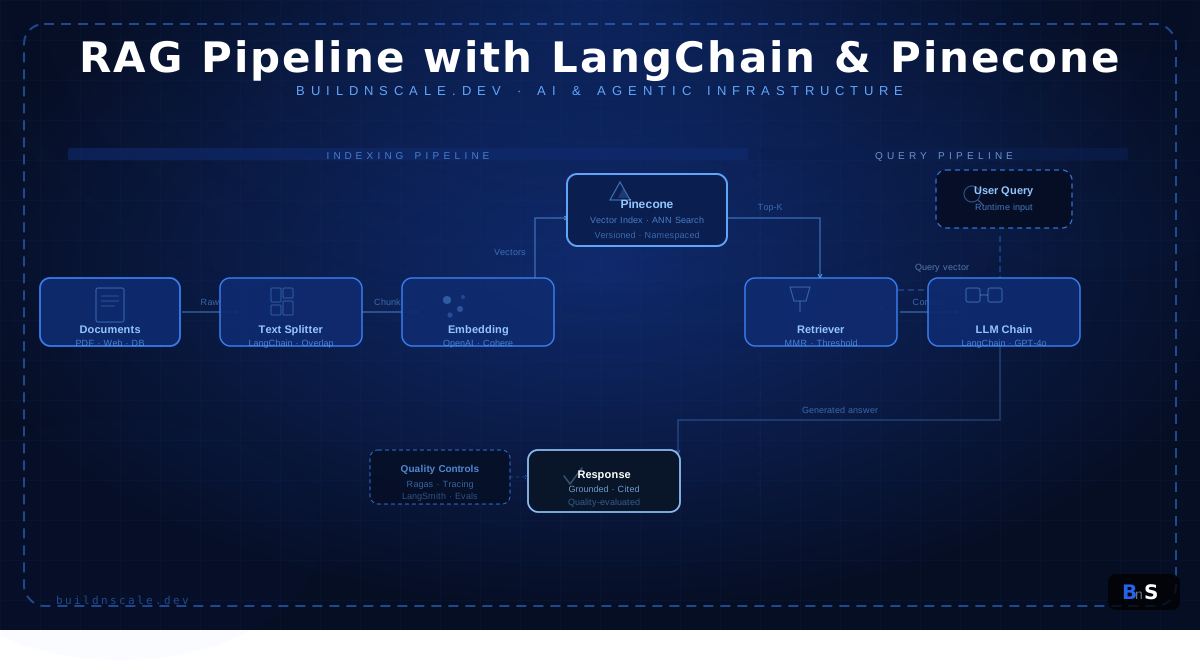
A RAG pipeline with LangChain and Pinecone fails in production for predictable reasons: noisy chunks, weak metadata, unbounded prompt context, and zero evaluation discipline. Demo systems answer a few curated prompts and look impressive. Production systems face ambiguous user intent, stale documentation, security boundaries, and strict latency and cost budgets. If you are shipping internal copilots, support assistants, or developer knowledge tools, retrieval reliability is what users trust, not model brand names.
This guide is for engineers who already know the basics and now need an implementation that holds up under load. You will build an end-to-end pipeline with versioned indexing, metadata-aware retrieval, citation-first answer generation, and an evaluation harness that catches regressions before they hit users.
Overview: what we are building and where it fits in your stack
The system in this article has two distinct planes. The first plane is offline indexing: load documents, normalize content, split into chunks, embed each chunk, and upsert vectors into Pinecone. The second plane is online answering: embed a user query, retrieve relevant chunks, construct grounded context, generate an answer with citations, and return a confidence-aware response. Treating these planes separately is not architecture theater. It is how you isolate failures and scale each stage independently.
Before implementation, define non-negotiables:
- Scope: what repositories, wikis, and runbooks are indexed.
- Trust contract: answer from evidence or decline.
- Latency target: set p95 for end user responses.
- Cost envelope: cap embedding and completion spend per request.
- Update policy: control when reindex runs and how rollbacks happen.
If your product UI is built with Next.js and your backend is Python, this RAG service should live behind a stable API boundary, similar to the approach in Next.js FastAPI full-stack architecture. That keeps retrieval iteration independent from UI deployment cycles.
To keep configuration explicit and environment-safe, start with a typed settings object.
# app/settings.py
from pydantic_settings import BaseSettings, SettingsConfigDict


class Settings(BaseSettings):
    openai_api_key: str
    pinecone_api_key: str
    pinecone_index_name: str = "buildnscale-rag"
    pinecone_namespace: str = "docs-v1"
    embedding_model: str = "text-embedding-3-small"
    chat_model: str = "gpt-4o-mini"
    chunk_size: int = 900
    chunk_overlap: int = 150
    retrieval_k: int = 8
    retrieval_score_threshold: float = 0.72

    model_config = SettingsConfigDict(env_file=".env", env_file_encoding="utf-8")


settings = Settings()This settings layer gives you deterministic behavior across local, staging, and production, which reduces mystery bugs during incident response.
Core concepts: why retrieval quality dominates generation quality
The common misconception is that a better model fixes a weak RAG stack. In practice, model upgrades only amplify whatever evidence you provide. Good context produces great answers. Bad context produces confident nonsense. That is why high-quality retrieval is the primary engineering problem.
There are four concepts to get right from first principles.
- Chunk semantics over chunk count. Chunks should preserve local meaning, not just token limits.
- Metadata as a control plane. Every chunk needs source, section, tenant, and version fields.
- Versioned indexing. Never overwrite production vectors without rollback capability.
- Grounded generation. Prompt templates must force evidence-bounded answers.
LangChain helps compose loaders, splitters, embeddings, retrievers, and chains. Pinecone provides low-latency ANN retrieval with namespaces and metadata filters. Together they are a strong operational pair, especially when you need to separate tenant data or run multiple documentation versions side by side.
The next code creates deterministic normalization and splitting primitives that preserve context and attach metadata before indexing.
# app/rag/core.py
from langchain_core.documents import Document
from langchain_openai import OpenAIEmbeddings
from langchain_text_splitters import RecursiveCharacterTextSplitter

from app.settings import settings


embeddings = OpenAIEmbeddings(
    api_key=settings.openai_api_key,
    model=settings.embedding_model,
)

splitter = RecursiveCharacterTextSplitter(
    chunk_size=settings.chunk_size,
    chunk_overlap=settings.chunk_overlap,
    separators=["\n\n", "\n", ". ", " ", ""],
)


def normalize_document(raw_text: str, source: str, version: str) -> Document:
    cleaned = " ".join(raw_text.split())
    return Document(
        page_content=cleaned,
        metadata={
            "source": source,
            "version": version,
            "pipeline": "rag-langchain-pinecone",
        },
    )


def split_documents(docs: list[Document]) -> list[Document]:
return splitter.split_documents(docs)If you are hardening the generation side too, use the response-shaping patterns from prompt engineering production AI to reduce format drift and improve reliability.
Step-by-step implementation: indexing, retrieval, and API serving
Build this in three testable modules: index management, ingestion, and query answering. Test each module independently before composing them.
The first code block creates or reuses a Pinecone index, generates deterministic vector IDs, and upserts in batches.
# app/rag/indexing.py
import hashlib
from pinecone import Pinecone, ServerlessSpec

from app.settings import settings


pc = Pinecone(api_key=settings.pinecone_api_key)


def get_or_create_index() -> None:
    existing = pc.list_indexes().names()
    if settings.pinecone_index_name not in existing:
        pc.create_index(
            name=settings.pinecone_index_name,
            dimension=1536,
            metric="cosine",
            spec=ServerlessSpec(cloud="aws", region="us-east-1"),
        )


def build_vector_id(source: str, text: str) -> str:
    digest = hashlib.sha256(f"{source}:{text}".encode("utf-8")).hexdigest()
    return digest[:32]


def upsert_batch(rows: list[dict]) -> int:
    index = pc.Index(settings.pinecone_index_name)
    vectors = []
    for row in rows:
        vectors.append(
            {
                "id": build_vector_id(row["metadata"]["source"], row["text"]),
                "values": row["embedding"],
                "metadata": row["metadata"],
            }
        )

    index.upsert(vectors=vectors, namespace=settings.pinecone_namespace)
return len(vectors)Now wire ingestion from filesystem to Pinecone.
# app/rag/ingest.py
from pathlib import Path
from langchain_core.documents import Document

from app.rag.core import embeddings, normalize_document, split_documents
from app.rag.indexing import get_or_create_index, upsert_batch


def load_markdown(path: str, version: str) -> list[Document]:
    docs: list[Document] = []
    for file in Path(path).rglob("*.md"):
        text = file.read_text(encoding="utf-8")
        docs.append(normalize_document(text, source=str(file), version=version))
    return docs


def run_ingestion(path: str, version: str) -> int:
    get_or_create_index()
    docs = load_markdown(path, version)
    chunks = split_documents(docs)

    total = 0
    batch_size = 100
    rows: list[dict] = []

    for chunk in chunks:
        rows.append(
            {
                "text": chunk.page_content,
                "embedding": embeddings.embed_query(chunk.page_content),
                "metadata": {
                    **chunk.metadata,
                    "text": chunk.page_content,
                },
            }
        )

        if len(rows) == batch_size:
            total += upsert_batch(rows)
            rows = []

    if rows:
        total += upsert_batch(rows)

    return total


if __name__ == "__main__":
    inserted = run_ingestion(path="./knowledge", version="2026-03-26")
print(f"Indexed vectors: {inserted}")Finally, create a retrieval-plus-generation function and expose it via FastAPI.
# app/rag/query.py
from openai import OpenAI
from pinecone import Pinecone

from app.rag.core import embeddings
from app.settings import settings


llm_client = OpenAI(api_key=settings.openai_api_key)
pc = Pinecone(api_key=settings.pinecone_api_key)
index = pc.Index(settings.pinecone_index_name)


def retrieve(query: str, version: str | None = None) -> list[dict]:
    vector = embeddings.embed_query(query)
    metadata_filter = {"version": {"$eq": version}} if version else None

    result = index.query(
        vector=vector,
        namespace=settings.pinecone_namespace,
        top_k=settings.retrieval_k,
        include_metadata=True,
        filter=metadata_filter,
    )

    matches = []
    for m in result.matches:
        if m.score >= settings.retrieval_score_threshold:
            matches.append(
                {
                    "score": float(m.score),
                    "source": m.metadata.get("source", "unknown"),
                    "text": m.metadata.get("text", ""),
                }
            )
    return matches


def answer_query(query: str, version: str | None = None) -> dict:
    rows = retrieve(query, version=version)
    if not rows:
        return {
            "answer": "I do not have enough verified context to answer this safely.",
            "citations": [],
        }

    evidence = "\n\n".join(
        [f"Source: {row['source']}\nContext: {row['text']}" for row in rows]
    )

    completion = llm_client.chat.completions.create(
        model=settings.chat_model,
        temperature=0,
        messages=[
            {
                "role": "system",
                "content": "You are a technical assistant. Use only provided evidence. If insufficient, decline.",
            },
            {"role": "user", "content": f"Question: {query}\n\nEvidence:\n{evidence}"},
        ],
    )

    return {
        "answer": completion.choices[0].message.content,
        "citations": [{"source": row["source"], "score": row["score"]} for row in rows],
}# app/main.py
from fastapi import FastAPI, HTTPException
from pydantic import BaseModel, Field
from app.rag.query import answer_query
app = FastAPI(title="RAG API", version="1.0.0")
class AskRequest(BaseModel):
question: str = Field(min_length=3, max_length=1200)
version: str | None = None
class AskResponse(BaseModel):
answer: str
citations: list[dict]
@app.post("/ask", response_model=AskResponse)
async def ask(payload: AskRequest) -> AskResponse:
try:
return AskResponse(**answer_query(payload.question, payload.version))
except Exception as exc:
raise HTTPException(status_code=500, detail=f"RAG execution failed: {exc}")This separation gives you cleaner test boundaries and supports partial rollouts during migration.
Production considerations: performance, security, and reliability
After correctness, your priorities are consistency and containment. The first production question is latency. Your p95 typically depends on embedding time, vector query time, and generation token count. Keep top_k constrained, filter with metadata aggressively, and avoid dumping raw chunks into prompts. A smaller high-confidence context usually outperforms larger noisy context.
The second question is relevance drift. Documentation changes constantly, so retrieval quality degrades unless indexing is versioned and scheduled. Keep version tags in metadata and run incremental reindex jobs. Never overwrite vectors blindly. If retrieval quality drops, rollback by namespace or version without touching application logic.
The third question is security. Indexed content can include sensitive values, stale credentials, or tenant-specific text. Add ingestion-time scrubbing, enforce tenant and version filters at query time, and avoid storing secrets in chunk text. For strict protection requirements, combine this with data encryption Python production for key handling and at-rest controls.
The fourth question is observability. Track retrieval score histograms, decline rate, token usage, and citation coverage. If user feedback declines while generation appears fluent, you likely have retrieval mismatch. Add request correlation IDs so one failed answer can be traced through query, retrieval, and generation stages.
If your workflow includes conversational memory and user identity, connect this retrieval path with session-aware logic in stateful chatbot with FastAPI. It is the cleanest way to keep persistent user context outside your retrieval index.
Common pitfalls and debugging patterns
Most teams hit the same failure modes. First is embedding-model mismatch. If you switch embedding models without reindexing, cosine similarity becomes meaningless even if queries still return results. Always reindex when model families change.
Second is metadata loss during transformation. Engineers attach metadata on documents, then forget to preserve it in vector payloads. You lose tenant scoping and version filters, and incident response becomes guesswork. Verify metadata presence before every upsert.
Third is chunking that ignores semantic boundaries. Tiny chunks increase ambiguity. Huge chunks increase token cost and add unrelated context. Start around 700 to 1000 tokens with 10 to 20 percent overlap, then tune using measured retrieval performance.
Fourth is no decline strategy. Systems that always answer create false confidence in high-risk contexts. Your API should explicitly return insufficient context when score thresholds are not met.
The following evaluation harness gives you a concrete regression check for retrieval quality.
# app/rag/eval.py
from app.rag.query import retrieve


TEST_CASES = [
    {
        "question": "How do we rotate API keys for production services?",
        "expected_source_contains": "security",
    },
    {
        "question": "What is the webhook retry policy?",
        "expected_source_contains": "webhook",
    },
]


def run_eval() -> None:
    passed = 0

    for case in TEST_CASES:
        rows = retrieve(case["question"])
        sources = " ".join([row["source"].lower() for row in rows])
        ok = case["expected_source_contains"] in sources
        print(f"{'PASS' if ok else 'FAIL'}: {case['question']}")

        if not ok:
            print(f"  Sources returned: {[row['source'] for row in rows]}")
        else:
            passed += 1

    print(f"Summary: {passed}/{len(TEST_CASES)} passed")


if __name__ == "__main__":
run_eval()Run this after every reindex and before every release. It is cheap insurance against retrieval regressions that are otherwise invisible until users complain.
Conclusion and next steps
A RAG pipeline with LangChain and Pinecone becomes production-ready when retrieval is deterministic, evidence is traceable, and behavior is measurable. The most effective teams treat RAG as a data system with strict operational controls, not as a prompt experiment. That mindset is what keeps quality stable as your document volume, user traffic, and product surface grow.
Your next actions should be direct:
- Build a benchmark set of real user questions and expected source files.
- Add score-threshold decline behavior in your API before launch.
- Version your index writes so rollback is operationally simple.
- Instrument retrieval and citation metrics in your observability stack.
For adjacent architecture work, continue with deploy Next.js 15 to production for delivery hardening and multi-agent AI system Python if you need planner-worker coordination on top of retrieval.
A reliable RAG system is not one perfect prompt. It is repeatable engineering discipline across ingestion, retrieval, generation, and feedback loops.
Written by
M. Yousaf MarfaniFull-Stack Developer learning ML, DL & Agentic AI. Student at GIAIC, building production-ready applications with Next.js, FastAPI, and modern AI tools.


